Sequencing project tasks means arranging them in the order they need to happen, based on their dependencies. A dependency is a relationship where one task can’t start or finish until another does. To sequence your work, list every task, identify which tasks rely on others, decide how they connect, and then order them so nothing is scheduled before the work it depends on is done.
Contents
TL;DR
- Sequencing means putting your tasks in the order they have to happen, based on what depends on what.
- A dependency is a link between two tasks where one can’t start or finish until the other does.
- There are four dependency types. Finish-to-Start is by far the most common.
- Sequence by listing tasks, finding their dependencies, then ordering them and spotting what can run in parallel.
What does sequencing mean?
Sequencing is deciding the order your tasks run in. Some tasks have to happen one after another, because one produces something the next one needs. Others can happen at the same time, because they don’t rely on each other. Good sequencing sorts out which is which, so your plan reflects how the work actually flows rather than a random to-do order.
It is the step that turns a flat task list into a real schedule. Once you know the order, you can assign dates and see your true end date. For the bigger picture, see how to create a project timeline.
What are task dependencies?
A task dependency is a link between two tasks where one relies on the other. The task that must happen first is the predecessor. The task that relies on it is the successor. “Build the walls” is a predecessor to “paint the walls,” because you can’t paint what isn’t built yet.
Dependencies are what make sequencing necessary. Without them, task order wouldn’t matter and you could do everything at once. With them, order becomes the difference between a plan that works and one that stalls.
The four types of dependencies
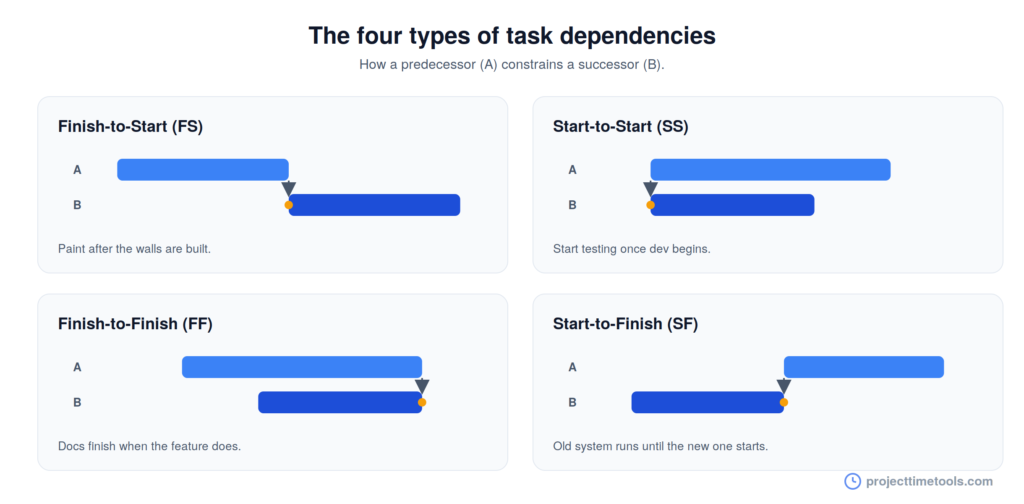
Most people only ever use the first one, but it helps to know all four:
| Type | What it means | Example |
|---|---|---|
| Finish-to-Start (FS) | The successor can’t start until the predecessor finishes | You can’t paint until the walls are built |
| Start-to-Start (SS) | The successor can’t start until the predecessor starts | Start testing once development has started |
| Finish-to-Finish (FF) | The successor can’t finish until the predecessor finishes | Documentation can’t finish until the feature does |
| Start-to-Finish (SF) | The successor can’t finish until the predecessor starts | The old system runs until the new one goes live |
Finish-to-Start is by far the most common and the most intuitive: finish one thing, then start the next. Start-to-Finish is rare and often confuses people, so don’t worry if you never use it.
How to sequence tasks in 5 steps
1. List all your tasks
Start with a complete list of the work. You can’t sequence what you haven’t captured, so get every task down first. If a task feels too big to place in an order, break it into smaller ones.
2. Find the dependencies
Go through the list and ask, for each task: what has to be done before this can start? Those answers are your dependencies. Mark each task’s predecessor so you know what it is waiting on.
3. Choose the dependency type
For most tasks, the link is Finish-to-Start and you can move on. Only reach for the other three types when a simple “finish then start” doesn’t describe the real relationship, like work that has to start together or finish together.
4. Order the tasks and spot parallel work
Now arrange the tasks so every one comes after whatever it depends on. As you do, look for tasks with no dependency between them. Those can run in parallel, which is how you shorten a project without cutting any work.
5. Map it onto your timeline
Turn the order into dates. Assign each task a duration and a start date that respects its dependencies, counting in working days so weekends don’t skew the plan. The Project Duration Calculator and Working Days Calculator handle the date math, and dependencies show up clearly on a Gantt chart.
What is the critical path?
The critical path is the longest chain of dependent tasks in your project. It matters because its length sets your shortest possible finish date. If any task on the critical path slips, the whole project slips with it.
Tasks that aren’t on the critical path have some slack, meaning they can move a little without affecting the end date. Knowing which tasks are critical and which have slack tells you where to focus attention and where you have room to breathe.
Common mistakes to avoid
- Inventing dependencies that aren’t real. If two tasks don’t actually rely on each other, don’t chain them. False dependencies make a project look longer than it is.
- Missing real dependencies. The opposite problem. A missed dependency means you schedule work before the thing it needs is ready.
- Ignoring parallel work. Running independent tasks one after another wastes time. Look for what can happen at once.
- Forgetting working days. Dependencies plus calendar-day math quietly push your dates past where you think they land.
- Sequencing once and never revisiting. As the project changes, the order does too. Keep it current.
To make sure the key checkpoints in your sequence are marked, read project milestones: what they are and how to set them.
FAQs
Sequencing tasks means putting them in the order they need to happen, based on their dependencies. It turns a flat list of work into a schedule by making sure no task is planned before the work it relies on is finished.
A task dependency is a link between two tasks where one relies on the other. The predecessor must happen first, and the successor depends on it. For example, walls must be built before they can be painted.
The four types are Finish-to-Start, Start-to-Start, Finish-to-Finish, and Start-to-Finish. Finish-to-Start, where one task must finish before the next starts, is the most common by far. Start-to-Finish is rare.
The critical path is the longest sequence of dependent tasks. Its length determines the shortest time in which the project can finish, so a delay to any task on it delays the whole project.
Yes. Tasks that don’t depend on each other can run in parallel. Spotting parallel work is one of the main ways to shorten a project without removing any of the work.