
Working days are the days a business normally operates, which in most countries means Monday to Friday, excluding weekends and public holidays. They are also called business days. To count the working days between two dates, count the weekdays in the range and then subtract any public holidays that land on a weekday. Most project schedules run on working days, not calendar days, which is why the distinction matters.
Contents
TL;DR
- Working days are the weekdays in a period, excluding weekends and public holidays.
- They are also called business days, and most projects run on them rather than calendar days.
- To count them, take the weekdays in your range and subtract any public holidays that fall on a weekday.
- Counting on calendar days instead of working days is a common reason deadlines slip.
What are working days?
A working day is any day a business normally operates. In most of the world that means Monday through Friday. Weekends and public holidays are not working days, because standard business does not run on them.
The term is used interchangeably with “business day.” If a contract says payment is due in “five business days” or a delivery takes “three working days,” both mean weekdays only, skipping any weekends and holidays in between.
▶ Skip the manual counting
Enter your start and end dates and get the working-day count in one click. Open the Working Days Calculator →
Working days vs. calendar days
This is the distinction that trips people up, and it is the reason schedules drift. Calendar days count every day on the calendar. Working days count only the days work actually happens.
| Calendar days | Working days | |
|---|---|---|
| Includes weekends | Yes | No |
| Includes public holidays | Yes | No |
| Used for | Simple date spans | Project schedules, contracts, deadlines |
| Example (2 weeks) | 14 days | 10 days |
Two calendar weeks are 14 calendar days but only 10 working days. If you plan a “10-day” task on calendar days when you meant working days, you have quietly given yourself four fewer working days than you thought.
Why working days matter for projects
Projects run on working days because that is when the work gets done. Nobody expects the team to build, test, or deliver over the weekend, so a realistic schedule has to skip those days.
The trouble starts when you mix the two. Estimate a task in working days but schedule it on calendar days, and the real finish date lands later than your plan shows. Do that across several tasks and the gap compounds into a project that is late before it starts. Counting in working days keeps your project timeline honest.
What counts as a non-working day
Two things are excluded when counting working days:
- Weekends. In most countries this is Saturday and Sunday, though not everywhere (more on that below).
- Public holidays. National or regional holidays that fall on a weekday. A holiday that lands on a weekend is usually already excluded as a weekend day.
What counts as a public holiday depends on your country and sometimes your region, so the same date range can have a different working-day count in different places. That is worth keeping in mind for any project that spans locations or teams.
How to count working days between two dates
You can count working days by hand with a simple method:
1. Count the total weekdays in your range
Go from your start date to your end date and count only the Mondays through Fridays. The quickest way is to count whole weeks first (each is five working days), then add the leftover days.
2. Subtract public holidays
Take out any public holidays that fall on a weekday inside your range. Holidays on a weekend don’t count, since those days were already excluded.
3. That total is your working days
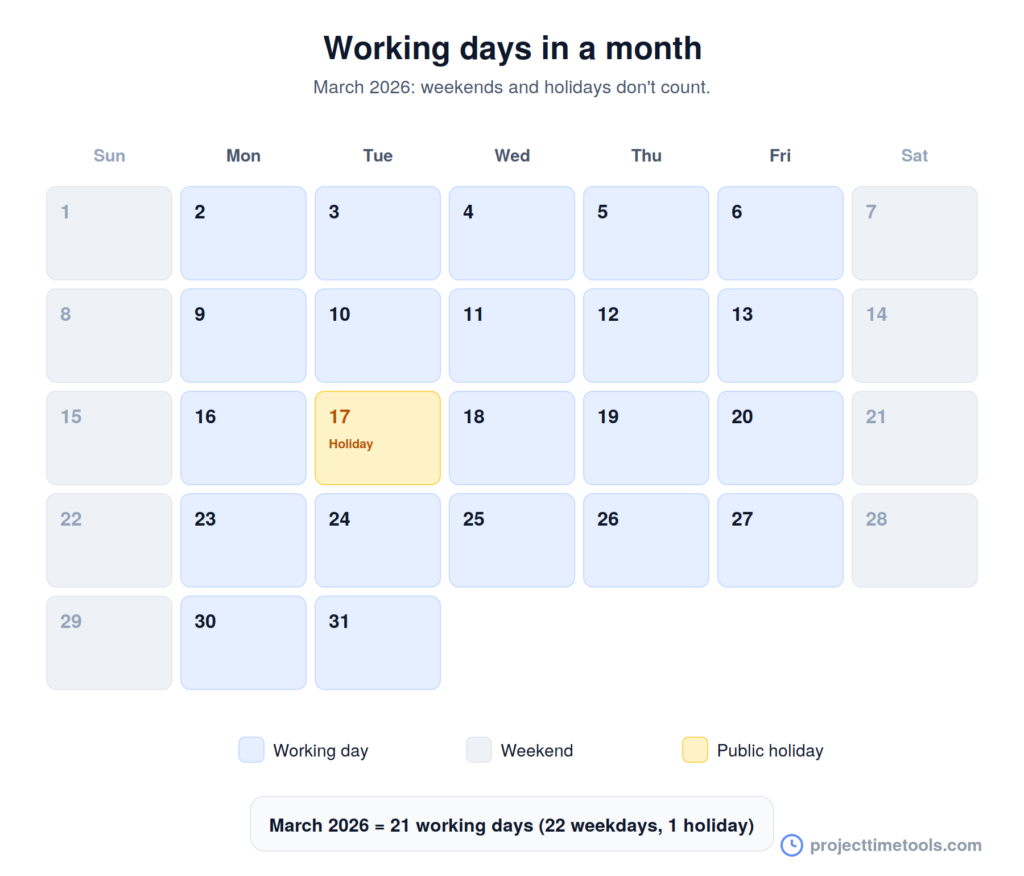
Worked example: from Monday, March 2 to Friday, March 27, 2026, there are exactly four full working weeks. That is 4 × 5 = 20 working days, with no public holidays in that range. Simple as the example is, doing this by hand gets fiddly fast once holidays and partial weeks are involved, which is where a calculator saves the guesswork.
How to add working days to a date
The reverse question comes up just as often: if something takes a set number of working days, when is it due? To add working days to a date, count forward from your start date, skipping weekends and holidays, until you have added the right number of working days.
For example, five working days after a Monday is the following Monday, not the Saturday, because the weekend does not count. To work forward or backward from a date without counting by hand, use the Date Calculator, and to find the plain gap between two dates, use Days Between Dates.
Working days by country
“Monday to Friday” is the most common working week, but it is not universal. In several countries the weekend falls on different days, so the working days shift with it. Public holidays vary even more, since every country, and sometimes every region, has its own set.
The practical takeaway: if your project involves teams or clients in more than one country, don’t assume a single working-day count applies to everyone. The number of working days in the same date range can genuinely differ from one location to the next.
FAQs
Working days are the days a business normally operates, usually Monday to Friday, excluding weekends and public holidays. They are also called business days and are used for schedules, contracts, and deadlines.
Calendar days count every day, including weekends and holidays. Working days count only the days work happens, so they exclude weekends and public holidays. Two calendar weeks are 14 calendar days but only 10 working days.
Yes. “Working days” and “business days” mean the same thing: weekdays on which a business normally operates, excluding weekends and public holidays.
No. A public holiday that falls on a weekday is not a working day and is excluded from the count. A holiday that falls on a weekend is already excluded as a weekend day.
Count the weekdays in your date range, then subtract any public holidays that fall on a weekday. Counting whole weeks first, at five working days each, makes it faster, or use a working days calculator to do it automatically.