
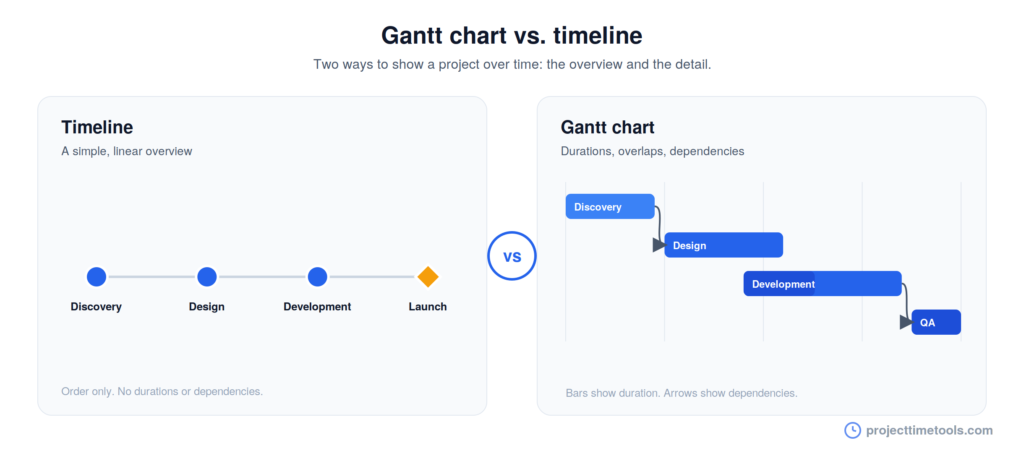
A timeline and a Gantt chart both show a project over time, but at different levels of detail. A timeline is a simple visual that lays out tasks and milestones in order, built to be read at a glance. A Gantt chart is a more detailed type of timeline that uses horizontal bars to show how long each task takes, where tasks overlap, and what depends on what. Choose a timeline for a clear overview, and a Gantt chart when you need to manage dependencies.
Contents
TL;DR
- A timeline is a simple, linear view of tasks and milestones in the order they happen.
- A Gantt chart is a detailed timeline that uses bars to show task durations, overlaps, and dependencies.
- Every Gantt chart is a timeline, but not every timeline is a Gantt chart.
- Use a timeline to communicate. Use a Gantt chart to manage complex, dependent work.
What is a project timeline?
A project timeline is a visual, ordered view of a project’s main tasks and milestones. It shows what happens and when, in a format simple enough for anyone to follow. Timelines shine when the goal is communication rather than detailed control.
For the full process, see how to create a project timeline.
What is a Gantt chart?
A Gantt chart is a type of timeline that shows each task as a horizontal bar along a calendar. The length of the bar represents the task’s duration, its position shows when it starts and ends, and connecting lines or overlaps show dependencies between tasks. Many Gantt charts also track progress, marking how much of each task is complete.
That extra detail is the whole point. A Gantt chart does not just show the order of work, it shows how the pieces fit together and where a delay in one task will ripple into others.
The key differences
Both plot a project over time, but they answer different questions. A timeline answers “what happens when?” A Gantt chart answers “how does it all fit together?”
| Aspect | Timeline | Gantt chart |
|---|---|---|
| Shows | Tasks and milestones in order | Task bars with durations and links |
| Level of detail | High-level and simple | Detailed |
| Dependencies | Not shown or only implied | Explicitly mapped |
| Task overlap | Hard to see | Clearly visible |
| Progress tracking | Rarely | Often, as percent complete |
| Best for | Quick overviews and updates | Managing complex, dependent work |
| Learning curve | Minimal | Steeper |
| Audience | Anyone, including clients | The project team |
When to use a timeline
Reach for a timeline when the job is to communicate. It is the right choice when:
- You are presenting to stakeholders or clients who want the big picture, not the mechanics.
- The project is small and does not have complex dependencies to track.
- You need something quick and readable for a kickoff, a proposal, or a status update.
- The audience is mixed, so the format has to be understood by people without a project management background.
When to use a Gantt chart
Reach for a Gantt chart when the job is to manage. It is the right choice when:
- Tasks depend on each other and you need to see how a slip in one affects the rest.
- Work overlaps and you want to see what runs in parallel at any point.
- You are tracking progress and need to know how far along each task is.
- The project is large or complex enough that a simple timeline would hide too much.
Is a Gantt chart a timeline?
Yes. A Gantt chart is a specific type of timeline, so every Gantt chart is a timeline, but not every timeline is a Gantt chart. The difference is detail. A basic timeline shows the sequence of work. A Gantt chart takes that same sequence and adds durations, dependencies, and overlaps on top.
Think of it as a spectrum. At the simple end sits a plain timeline with a few dated tasks. At the detailed end sits a full Gantt chart. You move along it based on how much control the project needs.
Which should you use?
The honest answer is that it depends on what you are trying to do, not on which tool is “better.”
If your main goal is to show people where the project stands, use a timeline. It is faster to make, easier to read, and better for anyone outside the core team.
If your main goal is to run a project with many moving parts, use a Gantt chart. The dependencies and overlaps it shows are exactly what you need to keep complex work on track.
Many teams use both: a Gantt chart to manage the detail internally, and a simple timeline to communicate progress outward. If you are not sure where to start, begin with a timeline. You can always add detail as the project grows, and for a lot of projects the simple view is all you ever need.
For a related distinction, see project schedule vs. project timeline, and to set the checkpoints that appear on either view, read project milestones: what they are and how to set them.
FAQs
A timeline is a simple, ordered view of tasks and milestones. A Gantt chart is a detailed timeline that uses bars to show task durations, overlaps, and dependencies. The timeline shows sequence; the Gantt chart shows how tasks relate.
Not quite. A Gantt chart is a type of timeline, so all Gantt charts are timelines, but not all timelines are Gantt charts. A plain timeline leaves out the durations and dependencies that a Gantt chart adds.
Use a Gantt chart when tasks depend on each other, when work overlaps, or when you need to track progress on a complex project. A simple timeline is better for quick overviews and for communicating with stakeholders.
Usually, yes. A Gantt chart holds more detail, so it takes more setup and is more work to keep updated. A timeline is quicker to build and easier for a general audience to read.
Yes, and many teams do. They use a Gantt chart to manage the detailed work internally and a simple timeline to communicate progress to stakeholders and clients. Both are views of the same project.