
Overseeing timeline execution means keeping a project on schedule once the work is underway. Where planning is about building the timeline, execution is about running it: tracking real progress against the plan, spotting where things are falling behind, and adjusting before a small delay becomes a missed deadline. Done well, it is mostly about comparing what is actually happening to what you planned, and reacting early.
Contents
TL;DR
- Overseeing timeline execution means tracking a project against its planned schedule as the work happens, and acting when it drifts.
- The core of it is comparing actual progress to your baseline, so you can see slippage while there is still time to fix it.
- Watch milestones, not just tasks: a missed milestone is your earliest warning that the end date is moving.
- Catching a slip early and re-planning beats defending a deadline that is already gone.
What overseeing timeline execution means
Overseeing timeline execution is the ongoing work of making sure a project follows its planned schedule. It covers three things: tracking how far along each task actually is, comparing that to where the plan says it should be, and taking action when the two do not match.
It only works if you have a plan to track against. That plan is your baseline, the version of the timeline you agreed at the start. Without one, “on track” is a guess. If you have not set that up yet, start with how to create a project timeline, then come back to run it.
Why it matters
Most projects do not fail on day one. They slip a little at a time, and nobody notices until the end date has already moved. Overseeing execution is how you catch those small slips while they are still cheap to fix.
The earlier you see a delay, the more options you have. Spot it in week two and you can re-sequence, add help, or trim scope. Spot it the week before launch and your only option is to move the date. The whole point of watching the timeline is to keep those early, cheaper options open.
How to oversee timeline execution
1. Track progress against the baseline
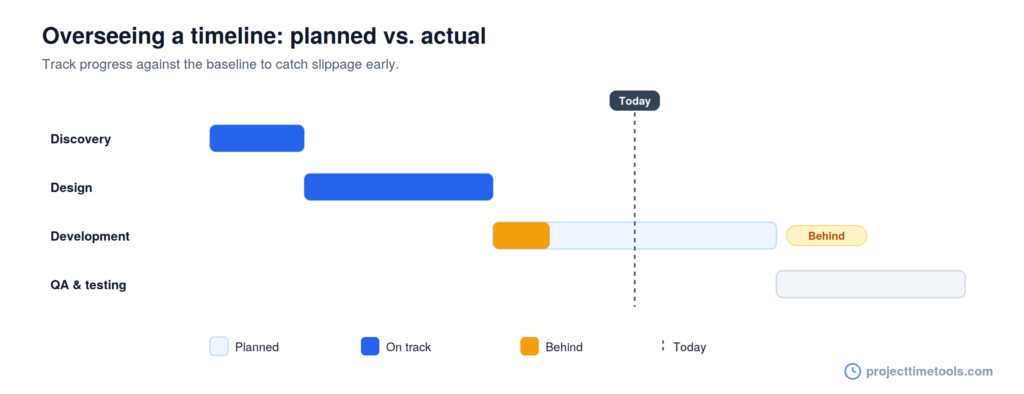
Compare where each task actually is against where your baseline says it should be. This gap, planned versus actual, is the single most useful thing to watch. A task that is 40% done when the plan expected 70% is behind, and now you know by how much.
2. Monitor milestones, not just tasks
Milestones are your early-warning system. A missed milestone means everything after it is at risk, so treat each one as a checkpoint. The Project Milestone Planner helps you keep those key dates in view as the project runs.
3. Spot slippage early
Look for leading signs, not just missed dates: tasks starting late, work sitting unfinished longer than planned, or dependencies backing up. These show up before a deadline is formally missed, which is exactly when you want to act.
4. Manage changes and re-baseline when needed
Scope will change and dates will move. When a change is real and agreed, update the schedule and, if it is significant, set a new baseline so you are tracking against reality rather than a plan everyone has quietly abandoned. Count in working days when you re-plan, so new dates do not land on weekends (see working days explained).
5. Keep stakeholders updated
Overseeing execution includes telling people where things stand. A short, regular status update, what is on track, what is behind, and what you are doing about it, keeps everyone working from the same picture and surfaces problems while they are small.
6. Adjust and re-sequence
When something slips, look at what can be resequenced or run in parallel to absorb the delay. Reordering independent work is often enough to protect the end date without cutting anything. For more on this, see how to sequence project tasks and dependencies.
Signs your timeline is slipping
A few early warning signs worth watching for:
- Tasks starting later than planned, even if they haven’t missed their end date yet.
- A milestone slipping, which puts everything after it at risk.
- Work sitting “almost done” for too long, a classic sign of a hidden blocker.
- Dependencies backing up, where one late task is holding several others.
- Status updates going quiet, which often means people are stuck and not saying so.
Tools to oversee execution
You do not need heavy software to keep a project on track. These free tools cover the essentials:
- Project Timeline Generator: keep the whole schedule visible and update it as work progresses.
- Project Milestone Planner: track the key checkpoints that tell you whether you are on course.
- Working Days Calculator: re-plan dates accurately when the schedule shifts.
Common mistakes to avoid
- Tracking tasks but not the baseline. Without a plan to compare against, you cannot tell whether you are actually behind.
- Watching only end dates. By the time a deadline is missed, it is too late. Watch start dates and progress instead.
- Never re-baselining. If the plan has changed but the baseline hasn’t, you are measuring against fiction.
- Silent status. No news is not good news on a live project. Chase quiet tasks.
- Reacting only at the deadline. The earlier you act on a slip, the cheaper it is to fix.
FAQs
It means keeping a project on schedule while the work is happening: tracking actual progress, comparing it to the planned timeline, and adjusting when the two drift apart. It is the execution-phase counterpart to planning a timeline.
Compare real progress against your baseline schedule, watch milestones as early-warning checkpoints, spot slippage before deadlines are formally missed, and re-sequence or re-plan early when something falls behind.
A baseline is the version of the schedule you agreed at the start of a project. You track actual progress against it to measure whether the project is ahead, on time, or behind.
Tasks starting late, milestones being missed, work stuck at “almost done,” dependencies backing up, and status updates going quiet are all early signs that a timeline is drifting.
Frequently enough to catch slips while they are small, which usually means a quick check against the plan at least weekly, plus a closer look at every milestone as it approaches.