
A project timeline and a project schedule are related but not the same. A timeline is a simple visual overview that shows when your key tasks and milestones happen, in sequence. A schedule is the detailed plan behind it, listing every task, how long it takes, what it depends on, and who is responsible. Put simply, the schedule holds the detail and the timeline shows the summary.
Contents
TL;DR
- A project timeline is a high-level visual of when your main tasks and milestones happen, in order.
- A project schedule is the detailed plan underneath it: every task, its duration, dependencies, and who does the work.
- The timeline is the dashboard. The schedule is the engine that drives it.
- Small projects often need only a timeline. Bigger ones need both.
What is a project timeline?
A project timeline is a visual, ordered view of a project’s main tasks and milestones from start to finish. It answers one question well: what happens, and when? Timelines are built to be read at a glance, which makes them ideal for sharing with stakeholders and clients who need the big picture, not the fine print.
For a full walkthrough, see how to create a project timeline.
What is a project schedule?
A project schedule is the detailed plan that sits under the timeline. It breaks the project into every task, assigns each a duration and dates, maps out dependencies, and often shows who is doing the work and how their time is allocated. Where a timeline is a summary, a schedule is the working document the team runs the project from day to day.
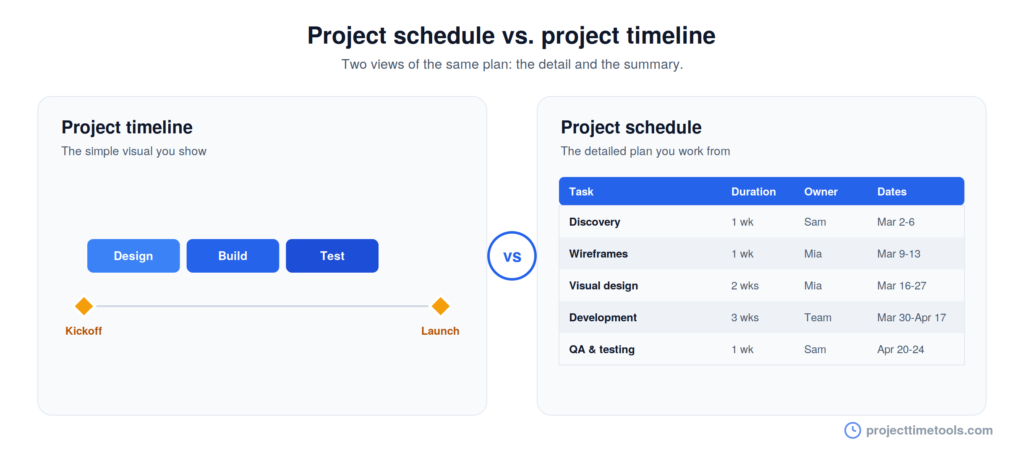
The key differences
Both cover the same project, but at different depths and for different readers. Here is how they compare:
| Aspect | Project timeline | Project schedule |
|---|---|---|
| Purpose | Show the big picture and sequence | Manage the detailed plan |
| Level of detail | High-level: key tasks and milestones | Granular: every task and subtask |
| Focus | When things happen, in order | Durations, dependencies, and owners |
| Resources | Rarely shown | Assignments and workload included |
| Dependencies | Simplified or implied | Explicitly mapped out |
| Best for | Communicating with stakeholders | Running the project day to day |
| Typical format | Visual bars or a line | Detailed table or Gantt chart |
| Audience | Everyone, including clients | The project team |
The short version: a timeline is what you show people, and a schedule is what you work from.
When to use each
Use a timeline when you need to communicate. Kickoff meetings, status updates, client check-ins, and proposals all call for a clean visual that anyone can follow without a project management background.
Use a schedule when you need to manage. Tracking dependencies, spotting resource clashes, and figuring out what a two-day slip does to the launch date all need the detail a schedule holds.
On a small project, the line blurs. A simple timeline with dated tasks often does both jobs, which is why the two terms get used interchangeably. The difference only really matters once a project is big enough that the detail no longer fits in a single readable view.
How they work together
They are not an either-or choice. On most projects, the schedule and the timeline are two views of the same plan.
You build the schedule first, working out every task, its duration, and its dependencies. To do that accurately, count in working days rather than calendar days, since weekends and holidays quietly push dates back. The Working Days Calculator and Project Duration Calculator handle that date math for you.
Once the schedule is solid, the timeline becomes the summary you present from it. Change the schedule and the timeline updates to match. The schedule is the engine, the timeline is the dashboard, and both point to the same finish date.
Which should you create first?
Start with the detail. Map your tasks, durations, and dependencies first, because that is what tells you whether the end date is realistic. Once the schedule holds together, create the timeline as the presentable version of it.
The exception is a small or simple project. If the whole plan fits comfortably in one visual, skip straight to a timeline and treat it as both your plan and your summary. There is no rule that says you need a heavy schedule for light work.
FAQs
A project schedule is the detailed plan listing every task, its duration, dependencies, and owners. A project timeline is a high-level visual of when the main tasks and milestones happen. The schedule holds the detail; the timeline shows the summary.
Not exactly. A Gantt chart is one detailed format often used for schedules, showing task bars and dependencies. A timeline is usually simpler and more visual. A Gantt chart can serve as both, depending on how much detail it includes.
Not always. Large or complex projects benefit from both: a schedule to manage the work and a timeline to communicate it. Small projects often need only a timeline that doubles as the plan.
They shouldn’t. Both are views of the same plan, so they should share the same finish date. If they differ, the timeline is out of sync with the schedule and needs updating.